
JavaScript Operators: The Basics You Need to Know

JavaScript Operators
JavaScript operators are symbols or keywords used to perform operations on values and variables. They are the building blocks of JavaScript expressions and can manipulate data in various ways.
There are various operators supported by JavaScript:
JavaScript Arithmetic Operators
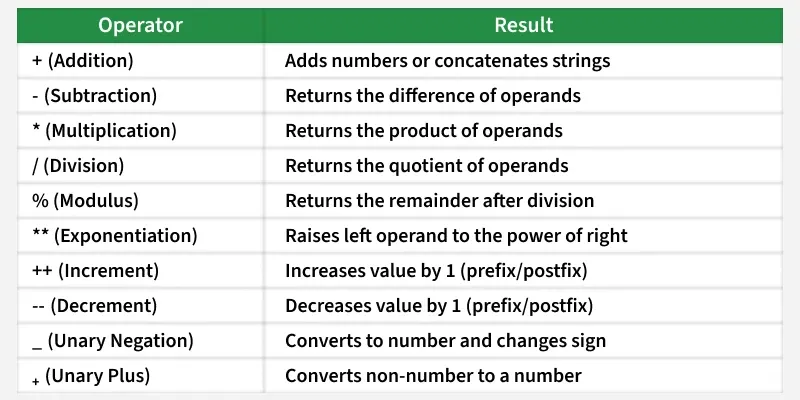
Arithmetic Operators perform mathematical calculations like addition, subtraction, multiplication, etc.
const sum = 5 + 3; // Addition const
diff = 10 - 2; // Subtraction const
p = 4 * 2; // Multiplication const
q = 8 / 2; // Division console.log(sum, diff, p, q);
adds two numbers.
subtracts the second number from the first.
multiplies two numbers. / divides the first number by the second.
JavaScript Assignment Operators
Assignment operator are used to assign values to variables. They can also perform operations like addition or multiplication while assigning the value.
let n = 10;
n += 5;
n *= 2;
console.log(n);
= assigns a value to a variable.
+= adds and assigns the result to the variable.
*= multiplies and assigns the result to the variable.
JavaScript Comparison Operators
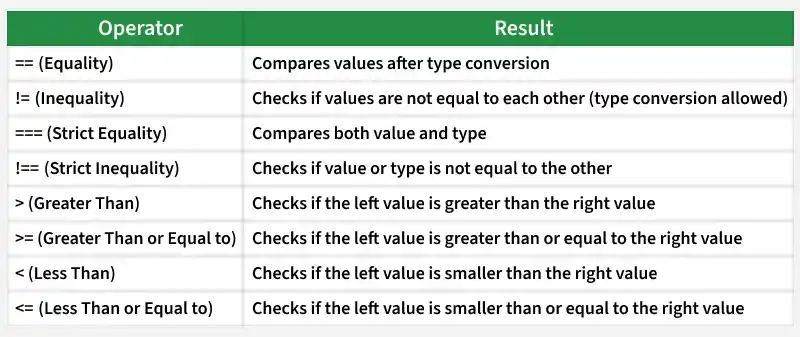
JavaScript comparison operators are essential tools for checking conditions and making decisions in your code.
console.log(10 > 5);
console.log(10 === "10");
checks if the left value is greater than the right. === checks for strict equality (both type and value). Other operators include <, <=, >=, and !==.
JavaScript Logical Operators
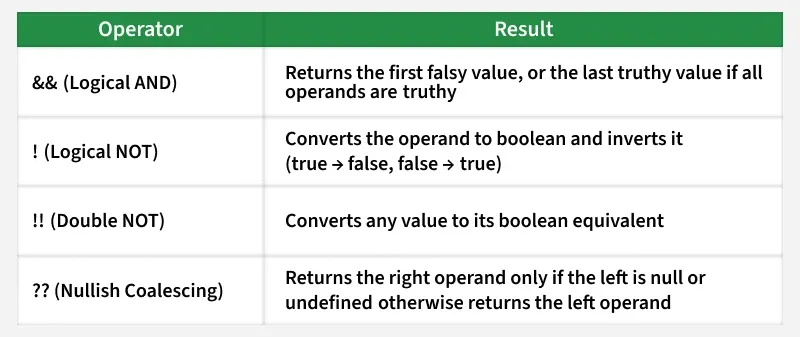
Logical operators in JavaScript are used to combine or modify boolean values to make decisions. They help control program flow by evaluating whether one or more conditions are true or false.
They are widely used in if statements, loops, and conditions.
Logical operators make it easier to handle multiple conditions at once.
const a = true, b = false;
console.log(a && b); // Logical AND
console.log(a || b); // Logical OR
&& returns true if both operands are true.
|| returns true if at least one operand is true.
! negates the boolean value.
JavaScript Bitwise Operators
In JavaScript, a number is stored as a 64-bit floating-point number but bitwise operations are performed on a 32-bit binary number. To perform a bit-operation, JavaScript converts the number into a 32-bit binary number (signed) and performs the operation and converts back the result to a 64-bit number.
List of Bitwise Operators
| OPERATOR NAME | USAGE | DESCRIPTION |
|---|---|---|
| Bitwise AND(&) | a & b | Returns true if both operands are true |
| [**Bitwise OR( | )**](https://www.geeksforgeeks.org/javascript/or-bitwise-operator-in-javascript/) | a |
| Biwise XOR(^) | a ^ b | Returns true if both operands are different |
| Bitwise NOT(~) | ~ a | Flips the value of the operand |
| Bitwise Left Shift(<<) | a << b | Shifts the bit toward the left |
| Bitwise Right Shift(>>) | a >> b | Shifts the bit towards the right |
| Zero Fill Right Shift(>>>) | a >>> b | Shifts the bit towards the right but adds 0 from left |
const res = 5 & 1; // Bitwise AND
console.log(res);
& performs a bitwise AND.
| performs a bitwise OR.
^ performs a bitwise XOR.
~ performs a bitwise NOT.
JavaScript Relational Operators
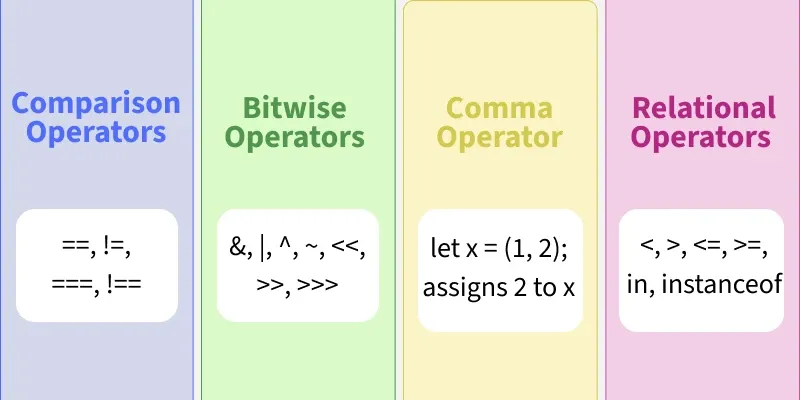
In JavaScript, the in and instanceof operators are used to check relationships within objects and classes.
The in operator checks whether a property exists in an object or an index exists in an array.
The instanceof operator checks whether an object is an instance of a specific class or constructor.
Both operators return a Boolean value (true or false) based on the result of the check.
JavaScript in Operator
The in-operator in JavaScript checks if a specified property exists in an object or if an element exists in an array. It returns a Boolean value.
let languages = ["HTML", "CSS", "JavaScript"];
// true (index 1 exists in the array)
console.log(1 in languages);
// false (index 3 doesn't exist in the array)
console.log(3 in languages);
Output
true
false
in checks if a property exists in an object.
instance of checks if an object is an instance of a constructor.
JavaScript Comma Operator
JavaScript Comma Operator mainly evaluates its operands from left to right sequentially and returns the value of the rightmost operand.
let x = (1, 2, 3);
console.log(x);
Output
3
Here is another example to show that all expressions are actually executed.
let a = 1, b = 2, c = 3;
let res = (a++, b++, c++);
console.log(res);
console.log(a, b, c);
Output
3
2 3 4
JavaScript Unary Operators
The unary plus (+) converts an operand into a number, if possible. It is commonly used to ensure numerical operations on variables that may contain numeric strings. If the operand is a string that represents a valid number, it will be converted to a number. Otherwise, it will evaluate to NaN (Not-a-Number).
decrement).
let x = 5;
console.log(++x); // Pre-increment
console.log(x--); // Post-decrement (Output: 6, then x becomes 5)
++ increments the value by 1.
-- decrements the value by 1.
type of returns the type of a variable.